
Why I Deleted a Cloudflare Worker and Moved My Private Dashboard Back to My Mac
Why I Deleted a Cloudflare Worker and Moved My Private Dashboard Back to My Mac
My dashboard was private, used by one person, and only valuable when it showed the newest local files. Deploying it after every change solved the wrong problem, so I replaced the Worker with a password-protected local server and a stable Cloudflare Named Tunnel.
Table of Contents
- The Worker was solving a public-site problem
- Why a Quick Tunnel was not enough
- The architecture I chose instead
- When this decision would be wrong
The Worker was solving a public-site problem
I built a private dashboard to browse reports, article drafts, images, planning notes, and operational files from a phone or another computer. The interface was useful because it reduced the friction of navigating a growing folder tree.
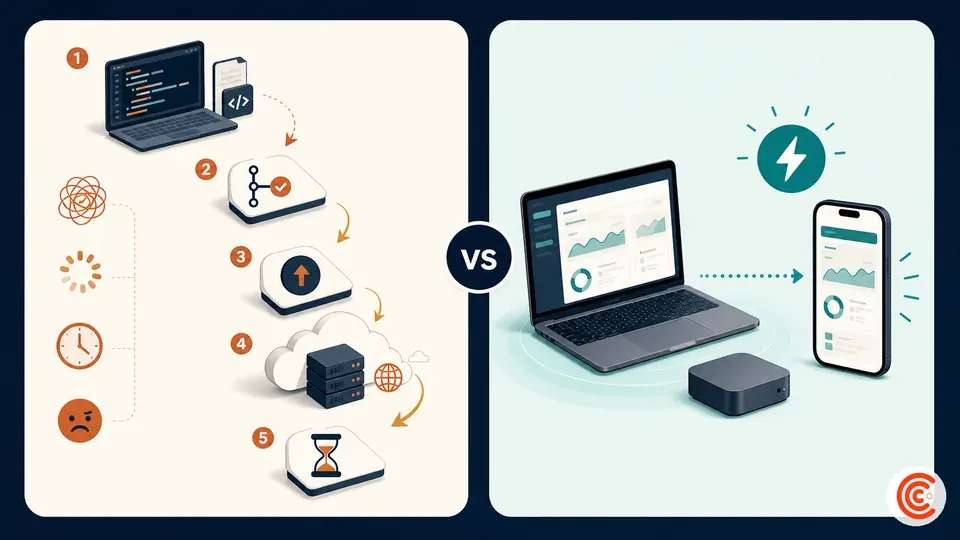
The first implementation followed a familiar web pattern: generate the static assets, commit them, push the repository, and let a Cloudflare Worker deployment expose the result.
That architecture had real strengths. The page was available when my computer was off. Cloudflare served it from its network. Deployment created a reproducible artifact. For a public website or a business-critical application, those are meaningful advantages.
They were not my primary requirements.
My dashboard had one intended user. Its most important property was freshness: I wanted to see the files currently on my computer, including work that I had not committed. Every deployment introduced a gap between the local workspace and the remote copy.
The workflow became:
- change a file;
- regenerate the manifest;
- commit;
- push;
- wait for deployment;
- confirm that the right version appeared.
I was performing a release process to look at my own files.
The maintenance surface grew as well. A package manager, Worker configuration, deployment metadata, and repository integration existed mainly to keep a private viewer online. A push could trigger a deployment even when the change was unrelated to the viewer. Removing that coupling was more valuable to me than permanent uptime.
## Why a Quick Tunnel was not enough
Cloudflare Quick Tunnels are an excellent discovery tool. One command can expose a local HTTP service at a random trycloudflare.com address without requiring an account or DNS setup:
cloudflared tunnel --url http://localhost:8080
Cloudflare explicitly positions Quick Tunnels for testing and development. The hostname is random, there is no uptime guarantee, the current concurrent-request limit is 200, and Server-Sent Events are not supported.
The random hostname was the decisive problem for my use case. I wanted to bookmark one address on my phone. I did not want to copy a new URL every time the process restarted.
A Named Tunnel binds a tunnel to a hostname under a domain I control. The DNS route persists even after the local process stops. When I restart the local server and cloudflared, the same address works again.
That persistence is easy to misunderstand. The page itself is not hosted by Cloudflare while my computer is off. Only the Cloudflare-side tunnel and DNS configuration remain. With no local connector, the origin is unavailable. That behavior is exactly what I wanted: the private page exists only when I intentionally run it.
| Option | Stable address | Works while Mac is off | Fits my one-user private viewer |
|---|---|---|---|
| Cloudflare Worker | Yes | Yes | More deployment than I needed |
| Quick Tunnel | No | No | Good test, poor bookmark |
| Named Tunnel to local server | Yes | No | Best fit |
| Tailscale Serve | Private tailnet address | No | Strong alternative when every client can run Tailscale |
| ngrok | Depends on plan/domain | No | Strong developer tooling, different pricing and limits |
The architecture I chose instead
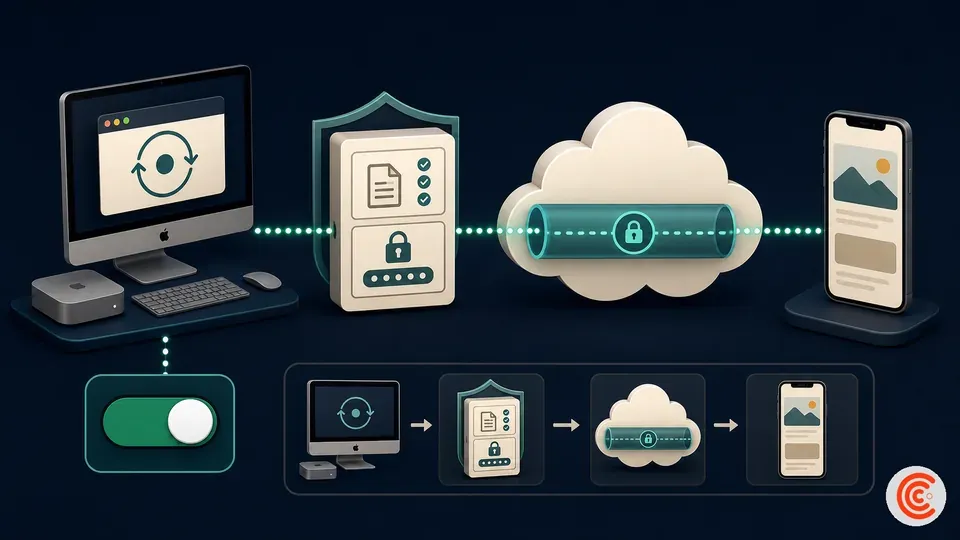
The replacement has three layers.
1. A local allowlisted server
A small Node server listens only on 127.0.0.1. It does not expose the entire repository. It serves an explicit list of dashboard directories and selected root files.
Requests for hidden paths, parent-directory traversal, symlink escapes, scripts, configuration files, and credential-like files are rejected. The response includes noindex and no-cache headers.
2. Application-level authentication
The local server requires a username and password. It uses a signed, time-limited session cookie, HttpOnly, and a secure cookie when accessed through HTTPS. Login attempts are rate-limited.
This is not a claim that a small custom login system is universally better than Cloudflare Access. Access can move authentication to Cloudflare’s edge and is a strong option for teams or identity-provider login. I kept a narrow application login because the intended audience is one person and the content server already needed an allowlist.
3. A Named Tunnel
cloudflared establishes an outbound connection to Cloudflare. No inbound port is opened on my router, and no public origin IP is required. Cloudflare routes the chosen hostname to the local loopback service.
The start script performs the operational steps together:
generate current dashboard index
start local authenticated server
start named tunnel
wait until interrupted
stop both processes cleanly
The result changed the meaning of “deploy.” I no longer deploy the dashboard at all. I start it.
## When this decision would be wrong
Moving back to a local machine was correct for my requirements, not a universal recommendation.
Keep the application on a Worker, Pages, or another cloud host when:
- other people depend on it;
- it must work while your computer is off;
- background jobs need predictable execution;
- you need production monitoring or an uptime commitment;
- the data already lives in a cloud database;
- the local machine is frequently disconnected;
- a public audience needs low-latency access.
Choose Tailscale Serve instead when the service should remain accessible only to devices in your tailnet and installing a Tailscale client on each device is acceptable. Tailscale’s Personal plan is currently free for personal, non-commercial use with up to six users, but its terms distinguish personal from commercial use.
Consider ngrok when request inspection, replay, webhook development, or its traffic-policy tooling matters more than staying inside the Cloudflare ecosystem. Its free plan currently includes one development domain and usage limits; custom-domain production use has a different pricing model.
For a fully managed public service, a small VPS or application platform is a better fit than a laptop. DigitalOcean, Hostinger, and Cloudways are potential commercial alternatives, but I did not use them for this dashboard and would not present them as first-hand recommendations.
Links and commercial placeholders
- Cloudflare Tunnel — official, non-affiliate link.
- Cloudflare Quick Tunnels — official, non-affiliate link.
- Tailscale Serve and Funnel — official, non-affiliate alternative.
- ngrok pricing and limits — official, non-affiliate alternative.
[AFFILIATE LINK PLACEHOLDER — DIGITALOCEAN] If I later test a VPS version, replace its official link with an approved DigitalOcean affiliate URL and add a clear disclosure. DigitalOcean currently advertises 10% monthly commission for one year through its affiliate program.
[AFFILIATE LINK PLACEHOLDER — HOSTINGER OR CLOUDWAYS] Add only in a separately tested managed-hosting comparison. Do not attach these links to the current recommendation as if they powered this dashboard.
Frequently Asked Questions
Did deleting the Worker delete the hostname?
The old Worker deployment was removed. The replacement Named Tunnel has its own persistent DNS route. Stopping the local process makes the page unavailable but does not delete that tunnel configuration.
Is a Named Tunnel the same as a Quick Tunnel?
No. A Quick Tunnel receives a random temporary hostname. A Named Tunnel uses a stable hostname under a Cloudflare-managed zone and remains configured across restarts.
Is the tunnel itself a password?
No. A tunnel connects traffic to the origin. Authentication must be provided by Cloudflare Access, the application, or another appropriate control.
Can this replace hosting for a public business site?
It can expose a service, but a laptop-dependent origin is usually a poor choice for a public business site that needs continuous uptime.
Why not use a VPN?
A private VPN or Tailscale is a good alternative. I preferred a normal HTTPS URL that worked in a browser without installing a client on every viewing device.
Key Takeaways
- The Worker was technically sound but mismatched to a one-user, local-first dashboard.
- Quick Tunnel proved the concept but did not provide a stable bookmark.
- A Named Tunnel preserved the hostname while allowing the local service to disappear when stopped.
- The local server still needed authentication, path allowlisting, and careful secret separation.
- This architecture trades uptime for freshness, simplicity, and owner control.
How this was written
This article is based on a real migration from a Cloudflare Worker deployment to a local password-protected server connected by a Named Tunnel. Exact hostnames, paths, identifiers, and credentials have been omitted. Cloudflare, Tailscale, and ngrok behavior was checked against current official documentation.
Comments ()